MTRX
A Figma plugin that reads a spreadsheet and populates copy into a component system automatically. Built for Apple Search Ads localization at scale.
Type:
Product Design / AI Tooling
Role:
Lead Designer and Builder
Team:
Antek Krystecki, Steven Chi
Timeline:
2 Weeks
Tools:
Figma, Claude, Google Sheets

CONTEXT
Apple Search Ads at Scale, With a Two-Person Team
Apple Search Ads puts an app in front of users directly in the App Store through exact match, broad match, and search match keywords. Each campaign required distinct headline copy across multiple markets and locales. A single campaign could require dozens of headline variants, all needing to be reflected individually in Figma. For a two-person team already running flat out, there was no room for it.
PROBLEM
Copy Population Was Manual, Repetitive, and Impossible to Scale
The existing process was straightforward but slow. A designer would take the approved copy, open each component in Figma, and manually paste the headline into the correct variant. One at a time. For a single campaign with ten locales and multiple headline variations, that meant dozens of individual edits. There was no systematic way to trace which variant had been updated, and no way to catch a missed field without going through every component manually.
01
Manual copy entry
Every headline had to be pasted individually into each component variant. No batching, no shortcuts.
02
No source of truth
Copy lived in email threads and shared docs with no direct connection to the Figma file.
03
Locale scale
Each new market multiplied the work. There was no reduction in time per variant as volume grew.
RESEARCH
Same Problem, Two Different Views of It
We ran separate sessions with Production and Marketing. The questions were open-ended and focused on how each team actually works today, not what they wished for. Both teams described the same workflow. Neither knew the other had the same complaint.
PRODUCTION
"I'm on one screen, flipping back and forth between the copy doc and Figma for every single locale. It takes forever and I make mistakes every time."
The process had no guardrails. One missed paste meant manually checking every component to find where it went wrong.
MARKETING
"We just need to turn these around faster. By the time the files come back, the moment has already passed."
Speed was the whole point of the Apple Search Ads channel. A multi-day production turnaround was defeating the purpose of running time-sensitive campaigns.
KEY INSIGHT
Neither team's problem was volume. The work itself had no creative variability. Production was making the same edits on repeat. Marketing was waiting on a bottleneck that design judgment played no part in. The solution didn't need to make the process faster. It needed to remove it.
SOLUTION
A Component System Built to Match a Spreadsheet
The approach started in Figma. We aligned with creative on a layout direction and built mechanical template files with FPO text and images. Each headline was designed as an individual component variant that links back to a central matrix grid living locally within the file.
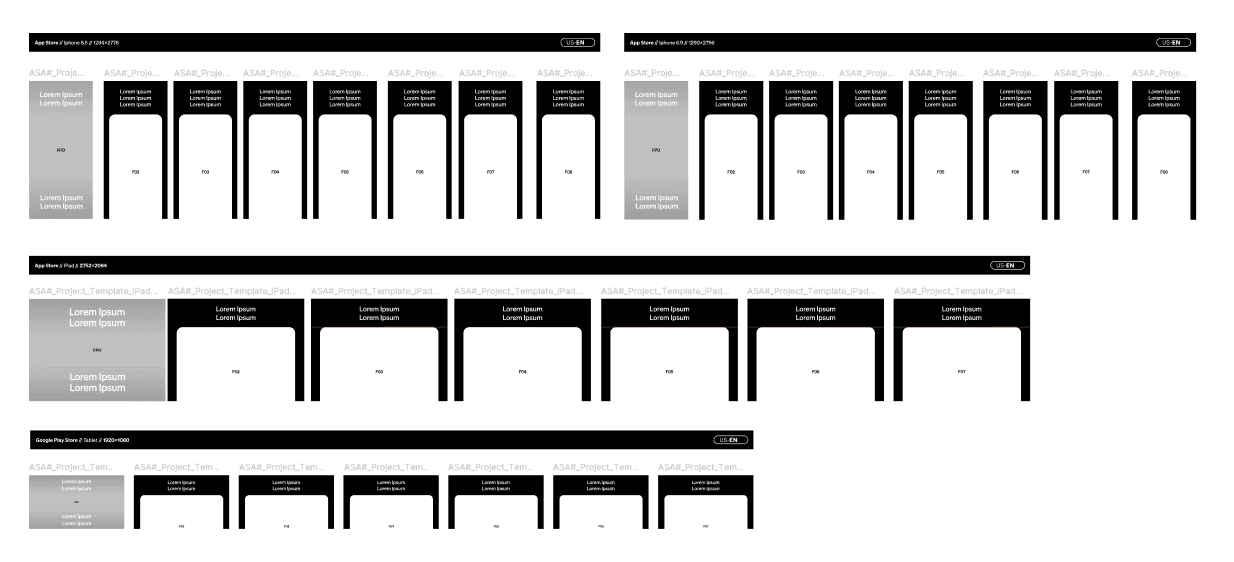
The component MTRX grid was built to directly correspond with a companion spreadsheet. Component names match column names exactly. Copy from any row in the sheet maps to the matching headline in the layout, either manually or through the plugin.
THE PLUGIN
From Hours to Minutes
Once the spreadsheet is populated, the link or CSV goes into the plugin. Adding more headlines to the Figma file and the spreadsheet doesn't require any changes to the plugin itself. It detects the expansion and flows accordingly.
Copy flows from the spreadsheet into the component system and from there into each variant in the layout. Built for Apple Search Ads, but the same approach works for any project where components map to structured data.
RESULTS
Hours of Back-and-Forth, Gone.
The spreadsheet integration didn't speed up the existing process. It removed it. Production no longer opened a copy doc, manually located a component, pasted a headline, checked the next locale, and repeated. That entire loop was gone. A campaign that previously required hours of careful manual work now runs in seconds from a single upload.
<30s
Time with MTRX
Upload the spreadsheet. The plugin reads it and populates every component automatically.
0
Manual copy touches
No context switching. No pasting. No checking. The source of truth is the spreadsheet.
Copy errors went away too. When a person pastes headlines one by one across dozens of components, something gets missed. With MTRX every variant gets its copy from the same source in the same pass. Nothing drifts because nothing is touched by hand.
WHAT I LEARNED
You Can Only Automate What You Fully Understand.
MTRX worked because the problem had a fixed shape. A known number of locales, a predictable copy structure, components with consistent naming. High volume, low variability, the same operations on repeat. Before writing any plugin logic, we mapped every element, every locale, every variant. That groundwork is what made the work replaceable.
Matching Figma component names to spreadsheet column names exactly looks simple but it was the load-bearing constraint the whole system rested on. Get that wrong and the plugin has nothing to anchor to. It also pointed to something broader: the right time to build a system is when the work is still small enough to fully see. Once the volume scales, the patterns get harder to extract. We had the advantage of knowing the work before we built the tool to replace it.