BLDR: Self Service
Marketing needed production-ready ads in hours.
Getting them took three days. This is how that changed.
Type:
Product Design / AI Tooling
Role:
Lead Designer and Builder
Team:
Antek Krystecki, Steven Chi
Timeline:
2 Weeks
bldr.square.com
CONTEXT
High Volume, Fast Timelines, No Room for Disruption
I was the Sr. Digital Production Designer on Square's Marketing Demand Generation team, a lean two-person production operation responsible for delivering thousands of assets annually across social, display, email, and direct mail. The team ran fast and volume was constant. Every campaign, every promo, every localized variant ran through us.
Sitting on top of all of that was a separate, time-critical 24hour turnaround workflow called Promo Ads.
Promo Ads were built for speed. When a sale, a important event, or a limited-time offer needed to go live, marketing needed production-ready assets within 24 hours. In practice that window was treated as ASAP. For a two-person team already at capacity, every promo request that landed meant stopping everything else to respond.
PROBLEM
A Bottleneck Was Costing Marketing 3 Days Per Campaign
A dedicated 24-hour rapid-response ad workflow was taking days to complete. A marketer would write copy, submit a ticket, wait for it to move through ops, get assigned to production, and only then would a designer begin manually building files in Figma. One by one. Copy pasted into each template. Every size. Every variant. Every locale.
None of that required creative judgment. The templates were locked. The brand rules were set. The copy came from marketing. Production was a highly skilled data entry layer sitting in the middle of a workflow that did not need us there.
Promo Ads were supposed to be fast. In practice they were the most disruptive work in the queue. Every request was treated as drop-everything priority, which meant everything else stopped. A workflow designed for simplicity and speed had become a recurring interruption, and nobody had ever mapped out why.
01
Too many handoffs
14 steps. 3 owners. Files changed hands up to 6 times before reaching marketing.
02
Nothing was automated
Every asset was built manually. Copy pasted into templates one by one, every size, every locale.
03
Marketing was blocked
Every promo required a ticket and a designer's time, even for zero-judgment work.
04
Everything else stopped
Promo Ads were treated as drop-everything priority. The whole queue paused for each one.
RESEARCH
A 14-Step Process for Work That Should Have Taken Minutes
To understand the full scope of the problem I mapped the existing Promo Ads workflow end to end. What I found was fourteen steps, three owners, and a handoff chain that was adding days to work that required zero creative judgment.
Files moved from Marketing to Ops to Production, back to Marketing for review, back to Production for revisions and export, through an internal QA pass, and finally back to Marketing for delivery. Every touchpoint was a potential delay. Every handoff was a waiting state. The same file changed hands up to six times before it reached its final destination.
INTERVIEWS
I spoke directly with marketing managers to understand the problem from their side. I wanted to know not just what they were submitting but how they were thinking about the work and where the process felt most painful.
What came back was consistent across every conversation. Marketers were not frustrated by production quality. They were frustrated by dependency. Every time a promo campaign needed to move, they had to stop, write a brief, submit a ticket, and wait. The work was simple enough that they felt they should be able to do it themselves. They just had no way to.
KEY INSIGHTS
After mapping the existing workflow and speaking directly with marketing managers, three themes emerged consistently across every conversation. None of them were about moving faster within the existing process. All of them pointed to the same conclusion: the process itself was the problem, and the solution had to work for the people it was failing most.
01
Dependency was the real problem
Marketing didn't need production to move faster. They needed to stop depending on it entirely.
02
The work required no designer
Template-driven, copy-driven, brand-constrained. No creative judgment required.
03
The solution had to work for marketing
Simple enough to use independently. No Figma knowledge. No training.
04
Control would unlock creative flexibility
Marketing wanted to iterate on the fly, not just get files faster.
IDEATION
Two Workflows. One Tool. No Design Team Required.
Before designing BLDR, we explored Figma Buzz as a reference point. The concept was proven: a control panel feeding live template output, with brand guidelines baked in. But the tool assumed the user was already comfortable in Figma. Marketing managers would still need a paid license, basic Figma navigation knowledge, and the ability to manage, name, and export files manually. For a team running campaigns at this scale, that friction would add time rather than save it. BLDR was designed to remove those assumptions entirely.
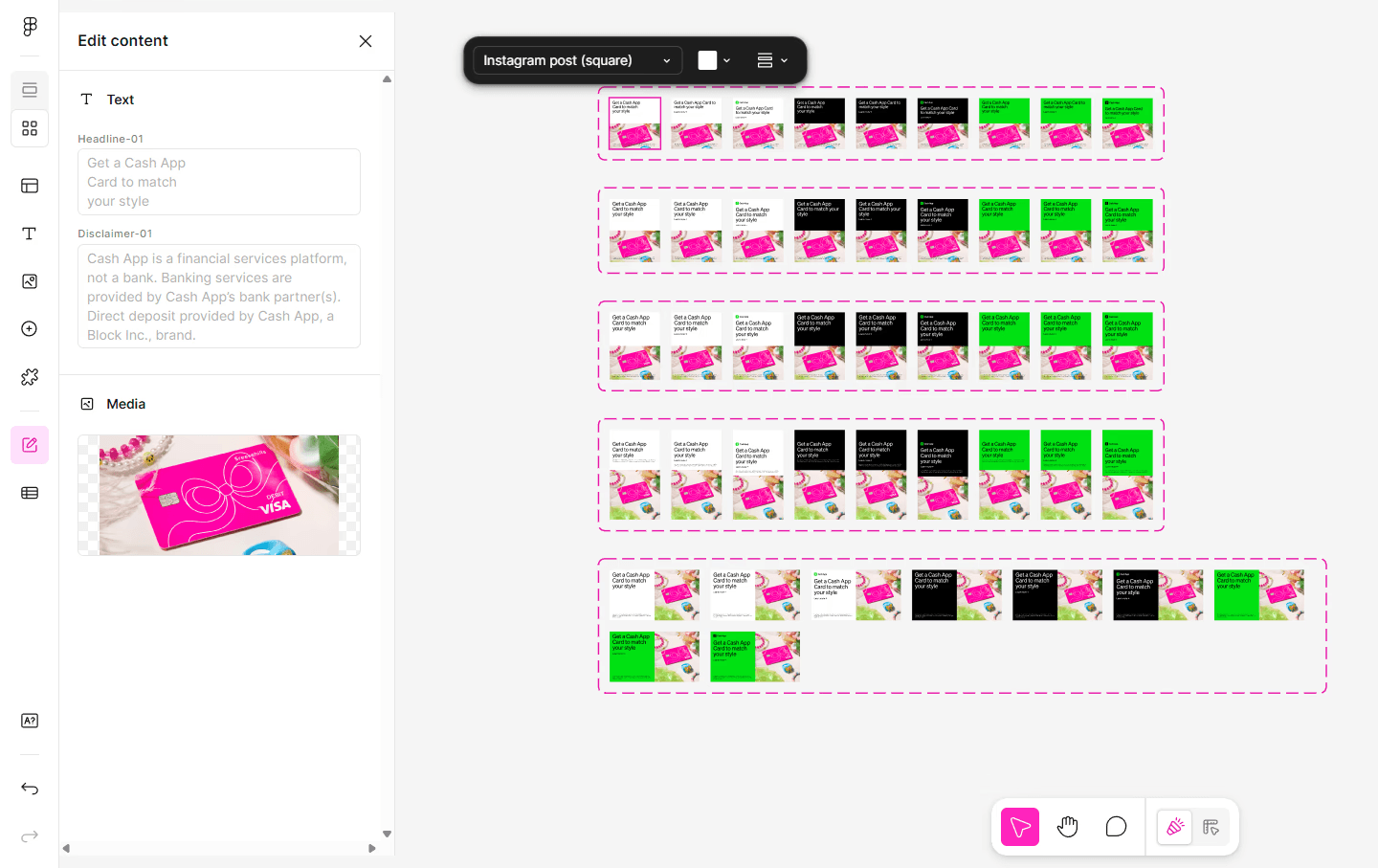
Figma Buzz with brand guidelines lock. Brand control exists, but the user is still navigating inside Figma to build, name, and export every file.
The research pointed to a clear requirement: marketing needed to generate assets without touching Figma, raising a ticket, or depending on anyone from production. The question was how to build something powerful enough to handle real campaign complexity while remaining simple enough for a non-designer to operate from day one.
PHASE ONE
Starting with Features, Not Screens
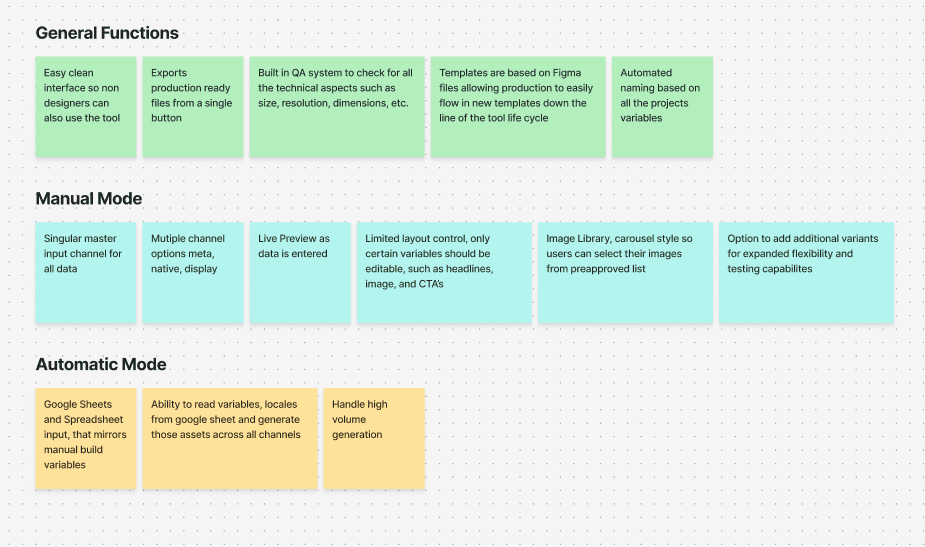
The ideation started with features, not screens. I mapped out what the tool needed to do across three categories: general functions that would apply to both workflows, manual build capabilities for one-off asset creation, and automatic generation capabilities for high volume campaign needs.
FEATURE MAPPING — FIGJAM WORKING BOARD
PHASE TWO
Two Entry Points. One Unified Output.
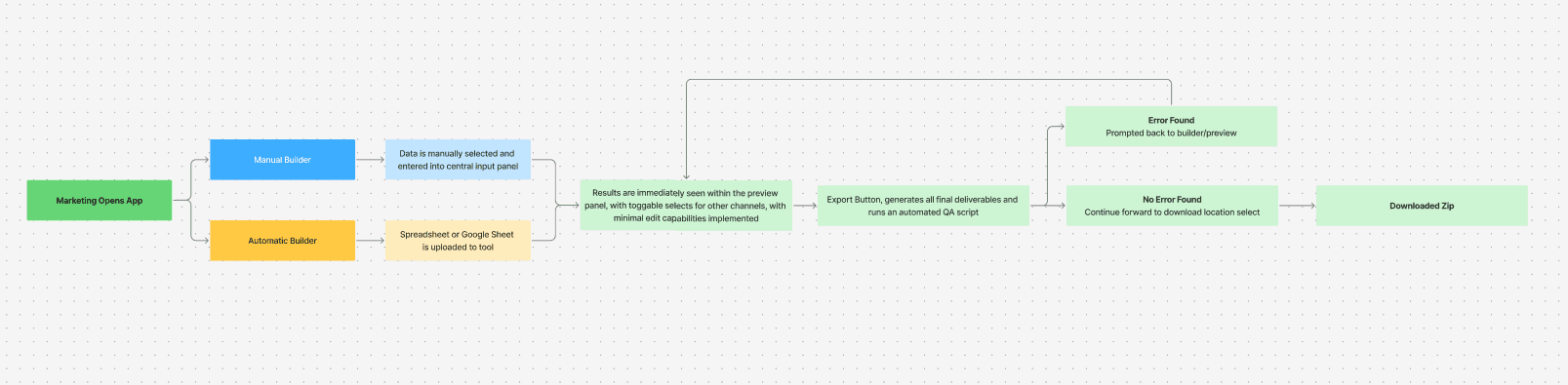
From that feature mapping a clear architecture emerged. Two distinct entry points, one unified output. Marketing opens the tool and makes a single choice: build manually using the Control Panel, or upload a spreadsheet and let the tool generate everything automatically. Both paths converge on the same live preview and export experience.
WORKFLOW ARCHITECTURE — TWO ENTRY POINTS, ONE OUTPUT
PHASE THREE
Lo-Fi Wireframes via Figma Make and Claude
To move quickly from concept to structure I used Figma Make and Claude as a collaborative tool. I fed in our ideas, the layout logic, and the two workflow model. After a few rounds of iteration we had lo-fi wireframes for both Manual Mode and Automatic Mode that captured the bones of each workflow well enough to start making real design decisions on top of them. With the structure in place, this was also the point where we could begin layering in real functionality alongside the design.
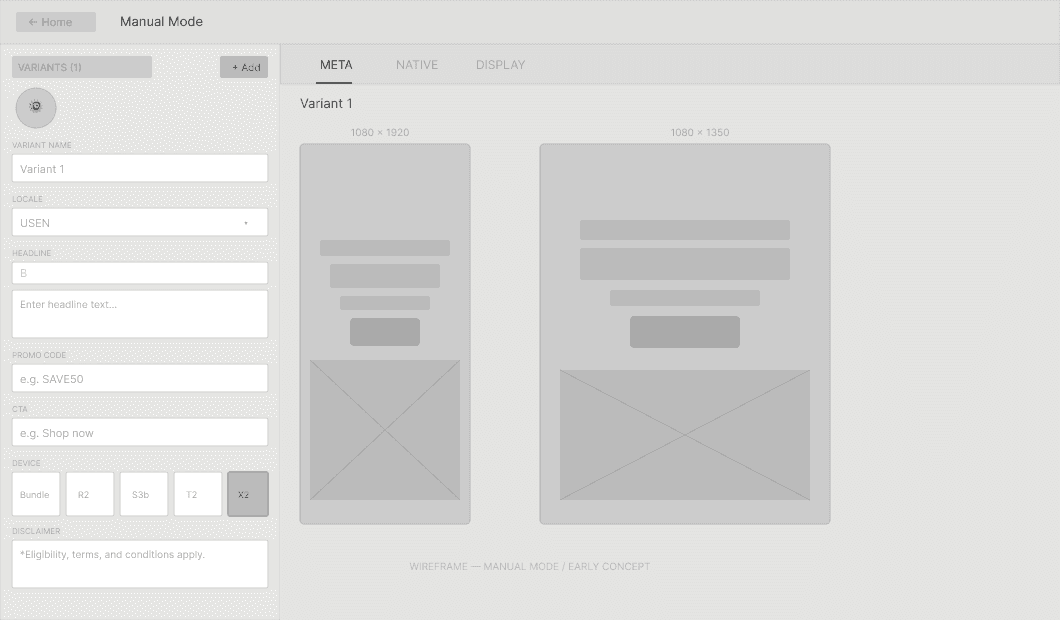
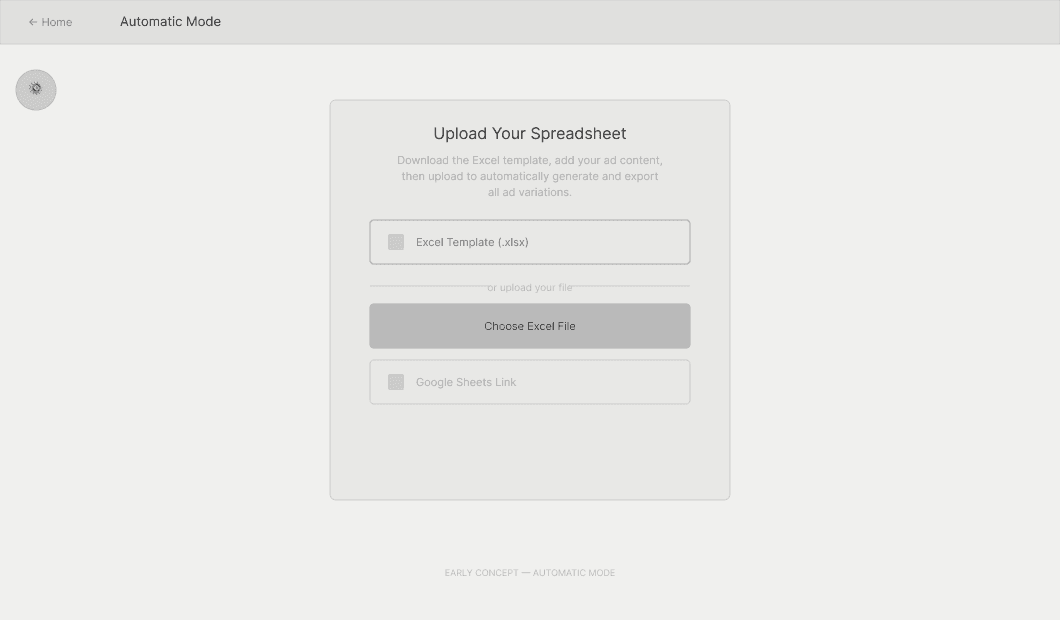
Lo-fi wireframes, Manual Mode (left) and Automatic Mode (right). Built in Figma Make with Claude.
TESTING
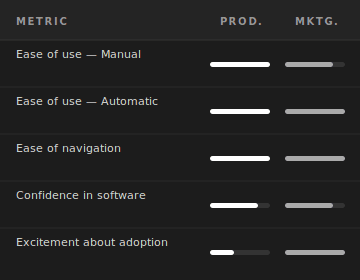
Production Found It Simple. Marketing Wanted More.
BLDR was tested with both teams it was designed to serve. Production and marketing had different relationships with the tool and different things they needed it to do. Testing with both gave us a complete picture of what was working and where the experience needed to go further.
TEST GROUP 1
Production Team
We tested with three production designers and gave them zero training. Each was handed a copy deck and asked to build and export a completed ad.
INSIGHTS
All three built and exported files without any guidance. Some expressed mild concern that the tool displaced the creative role of production.
ACTION
No interface changes required. Designer displacement noted as a cultural consideration for AI rollout, not a design problem to solve.
TEST GROUP 2
Marketing Team
We walked marketing partners through both Manual and Automatic Mode, giving them time to explore at their own pace. They picked it up quickly.
INSIGHTS
Both built and exported files with minimal guidance. Automatic Mode immediately prompted a conversation about overhauling their campaign process entirely.
ACTION
Automatic Mode validated the two-workflow decision. Marketing was already planning around the tool before it shipped.
FINAL DESIGN
What Took 3 Days Now Takes 10 Seconds
BLDR was built as a fully functional self-service tool, not a prototype. Two distinct workflows covered every use case: bulk campaign generation for volume, and a manual builder for speed and flexibility. Both paths converged on the same output — production-ready, brand-safe files, exported and named automatically.
MODE 01
Automatic Mode
Designed for volume. A marketing manager downloads a pre-formatted Excel template, populates it with campaign variables, and uploads it back. BLDR reads the spreadsheet and generates every required ad variation across all sizes, formats, and locales automatically. Files come out named, sized, and export-ready. The entire process takes under 10 seconds.
02
Spreadsheet Input
02
Bulk Generation
03
Automated QA
MODE 02
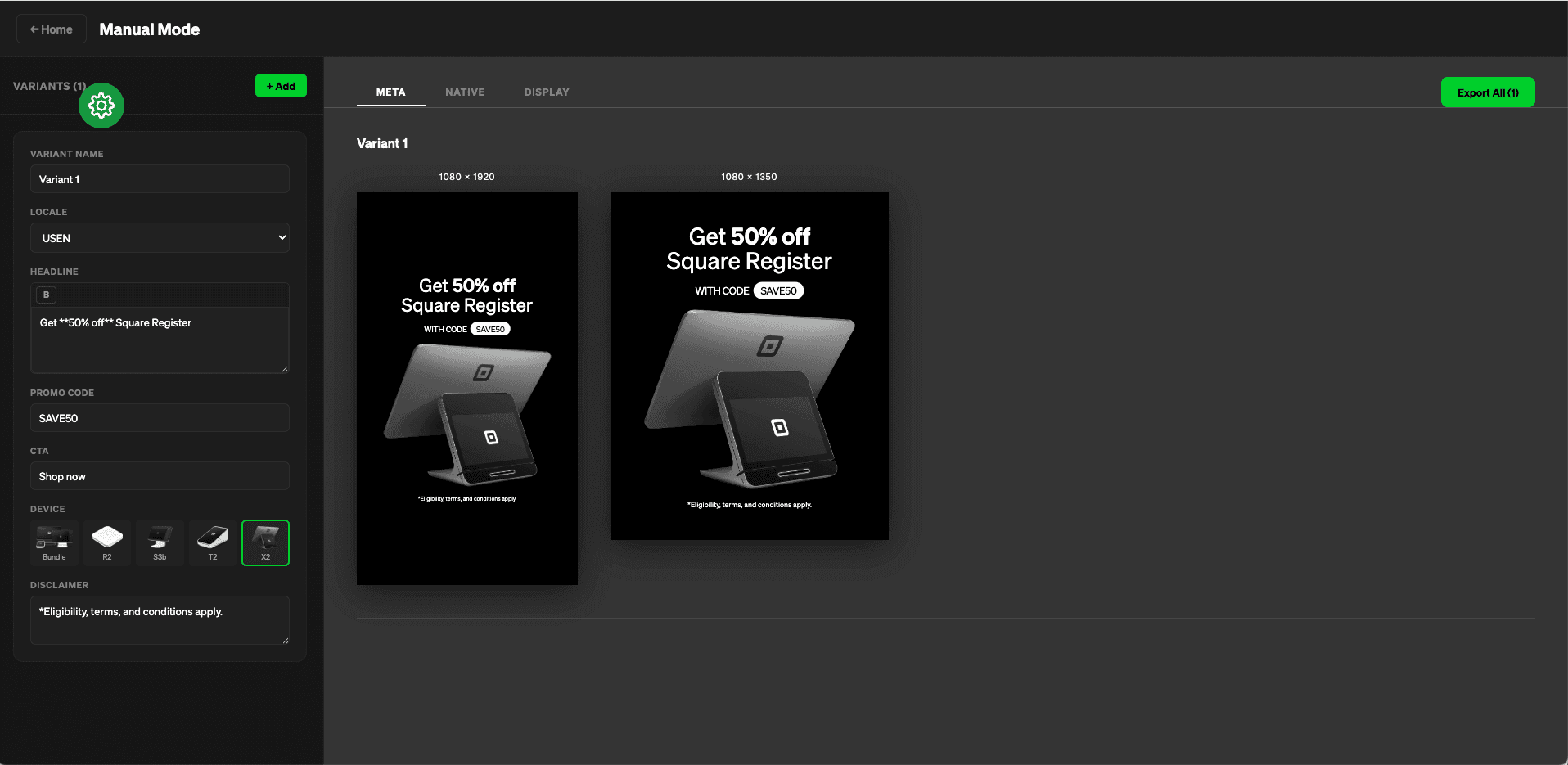
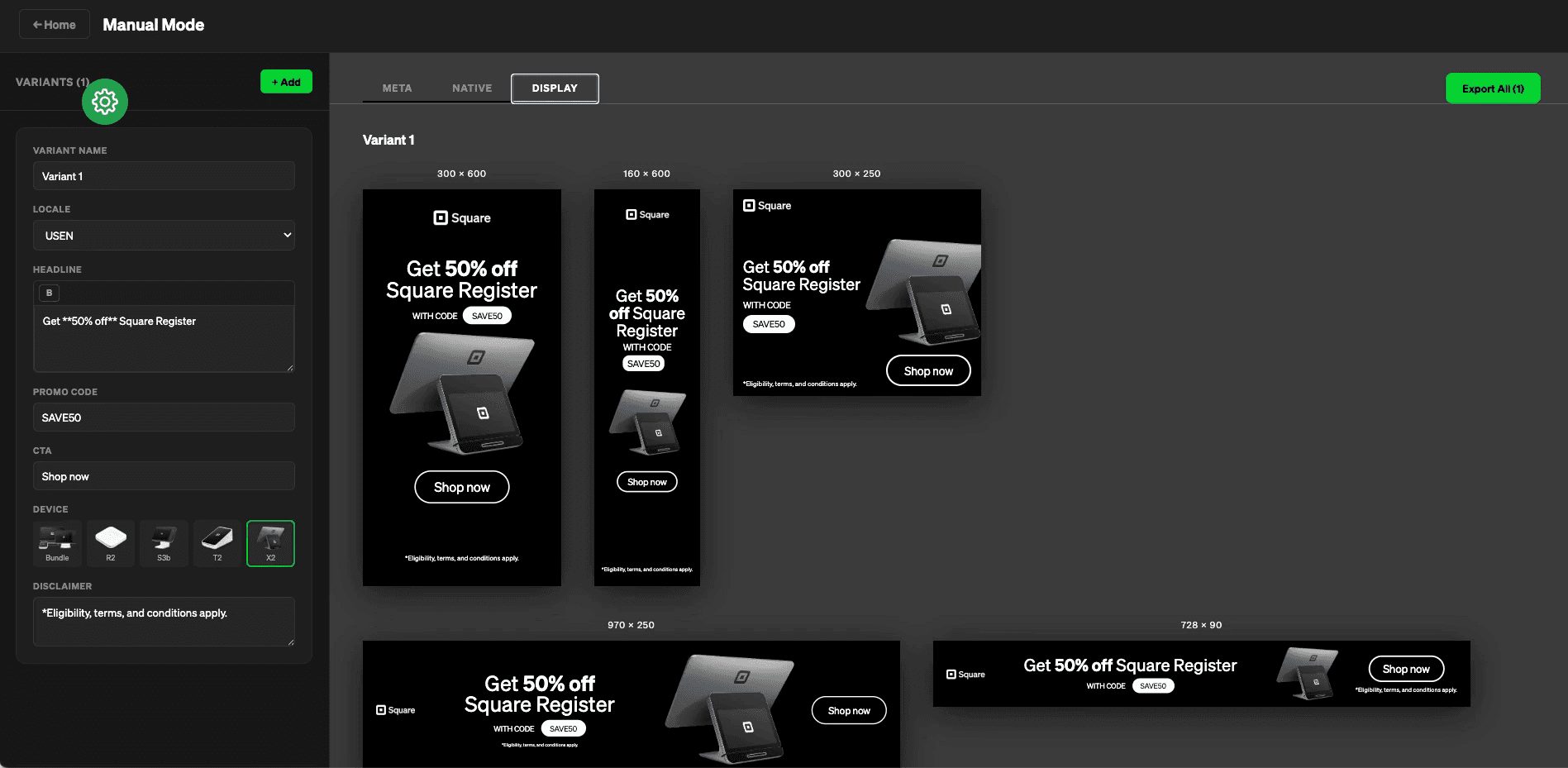
Designed for flexibility and speed. A single Control Panel on the left lets the user set variant name, locale, headline, promo code, CTA, device, and disclaimer. The live preview on the right updates in real time across all ad sizes simultaneously. Channel tabs allow instant switching between Meta, Native, and Display formats. A single Export All button delivers the complete set of production-ready files.
01
Control Panel
Single input panel propagates all variables across every ad size and format in real time. One change updates everything.
02
Live Preview
Every ad size updates simultaneously as inputs change. No switching between artboards, no guessing how it will look.
03
Multi-Locale Support
Language and locale switching built directly into the Control Panel. International campaigns handled in the same workflow.
FUNCTIONAL DEMO
RESULTS
Production, Reimagined for the AI Era
This was not just a fix for a broken workflow. It was a proof of concept for what modern production looks like — a two-person team, a self-service tool, and AI automation replacing a 14-step manual process. BLDR was presented to the full cross-functional team on the same day the company announced layoffs. The tool was shelved as a working prototype. The problem it solved was real. Both teams it was built for validated it enthusiastically. The layoff ended the project. Not the work.
1
14 Steps, Collapsed to One
A workflow that required three owners, six handoffs, and days of waiting was replaced by a single upload. Removing production from the loop was not a workaround. It was the right answer.
10s
3 Days, Down to 10 Seconds
What once took up to three days from brief to delivery now takes under ten seconds. Not because the team got faster. Because the process was rebuilt from scratch around what the work actually required.
0
Tickets Required
Marketing no longer needed to raise a ticket, write a brief, or wait on a designer to move a campaign forward. BLDR gave them creative independence without sacrificing brand control. That was the real result.
WHAT I LEARNED
The Work That Matters Most Is the Work Nobody Asked For
The most valuable thing BLDR taught me had nothing to do with the tool itself. Sitting inside a production workflow for two years gave me a view of the problem that no brief could have captured. I knew exactly where the delays lived, who owned them, and why they kept recurring. That embedded context was the design advantage. Without it, I would have built a tool that solved the wrong problem slightly faster.
I tested with production designers first because they were available and I trusted their instincts. Every session went smoothly. That felt like progress. It was not. The real test was a marketing manager with zero design background using it cold. That session exposed three interface assumptions I had made without realizing it. Test with the person who will actually use it, not the person who will understand it.
If I had more time, the next version of BLDR would add motion. Static ads were the starting point because that was the immediate pain, but every channel marketing was running on, Meta, Display, Native, supports animated formats. The manual build workflow already had the structure to support it: a control panel feeding live previews across sizes. Extending that to timeline-based animation output, or even pre-created animations that could be selected, was the logical next step.